MapGame
- 4.6
- Rating
- 100.00K
- Installs
- Free
- Price
 Analysis by App-foxy
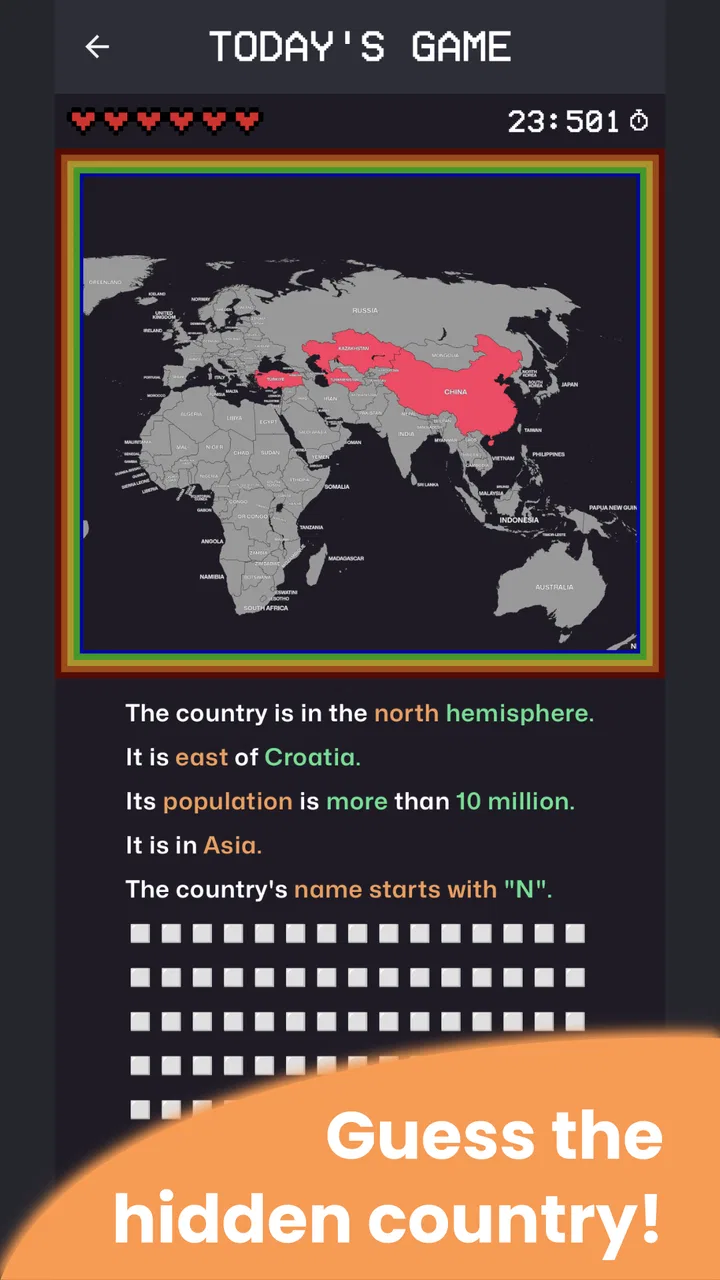
I enjoy trivia games that make me think without requiring a long explanation, and MapGame fits that mood particularly well. It turns geography into a short guessing challenge: a country is hidden on the map, and I try to identify it from the visual information available. That simple idea makes it easy to start while still leaving room for genuine learning, especially when I notice how often my first instinct is based on a familiar outline rather than a careful look.
What makes it interesting in a household is that it works naturally as a shared-device game. I can hand the phone to someone else for the next guess, compare reasoning, and turn a quiet few minutes into a small geography contest. It is not a complicated multiplayer experience, and I would not treat it as one, but the pass-and-play feel suits families, couples, classmates, or friends sitting together. The game’s focus stays on the map rather than on profiles, chat, or a large social system.
How MapGame feels in everyday use
My favorite way to use it is in short sessions. If I am waiting for food, taking a break, or sitting with someone who wants a quick challenge, the hidden-country format gives us an immediate activity. There is no need to explain a long story or learn a complicated control scheme. The central question is clear from the beginning, and every guess invites a conversation about borders, coastlines, neighboring countries, or regional geography.
You May Also Like

 Blood Strike: 2.5 Anniversary
Blood Strike’s Loadouts Turn Every Drop Into a Tactical Gamble
A close look at Blood Strike’s custom loadouts: how fast access to signature weapons reshapes its battle royale rhythm, rewards preparation, and narrows the gap between fights.

 Pandora - Music & Podcasts
Pandora’s Music Is Easy to Start, but Harder to Recover
Pandora’s strength is its low-effort path from a seed to a station. Its weak spot is how much confidence it asks you to place in connection, setup, and quiet recovery.

 8 Ball Pool
8 Ball Pool Is Built on Rivalries, Rematches, and Routine
A close look at the rivalries, rematches, shared routines, and unanswered safety questions that turn a quick pool match into a persistent mobile community.

 Samsung Music
Samsung Music’s Quiet Strength Is Playing What You Already Own
Its reach comes less from spectacle than from dependable access to a personal library. That simplicity is both the app’s strongest retention engine and its ceiling.

 AccuWeather: Weather Radar
AccuWeather Review: A Quick, Clear Forecast for Everyday Decisions
For everyday plans, the best forecast is the one you can understand quickly. AccuWeather makes rain timing, radar, and local conditions easy to act on, with a few trade-offs.

 Hill Climb Racing
Why Hill Climb Racing Still Turns Crashes Into One More Run
A tiny car, a bumpy hill and one more upgrade: Hill Climb Racing keeps resurfacing because its simple chaos makes every near-miss feel personal.
More From Our News Desk
View All News


That simplicity is also the reason I would not compare it directly with a broad quiz platform. A general trivia app may offer many subjects, timed rounds, leaderboards, or large question banks across entertainment, science, and history. MapGame is narrower. Its value comes from staying with one visual skill: reading a map and connecting shapes or locations with country names. If geography is the part of trivia you actually enjoy, that focus feels refreshing. If you want variety every time you open a game, it can feel limited.
The game belongs to the trivia category and is developed by whidev. It is free to download, with in-app purchases listed at $3.99 per item. That makes it easy to try before deciding whether it deserves a regular place on a shared phone or tablet. I appreciate that the basic idea is accessible without asking a household to commit money immediately, although anyone sharing a device should still pay attention before confirming a purchase.
The store presents it as a game for everyone, and that matches the basic accessibility of the concept. A child who recognizes a few countries can participate, while an adult with stronger geography knowledge can still be challenged by less obvious shapes or locations. The age label should not be confused with guaranteed educational suitability for every child, though. Younger players may need help reading the map, understanding borders, or accepting an incorrect answer without turning the session into an argument.
A practical shared-device routine
MapGame works best for shared use when players agree on a simple routine before starting. One person holds the device, everyone gets a chance to study the map, and the next player takes over after the answer. This avoids the common problem where the quickest person dominates every round. The game itself does not need to provide a family tournament system for this approach to work; the household can create a fair rhythm by passing the device deliberately.
A useful variation is to ask each player to explain the clue they noticed before anyone gives an answer. One person might focus on the outline, another on the surrounding region, and a third on a coastline. This turns a correct guess into a small lesson instead of a race. It also helps younger players see how experienced players reason, rather than simply hearing the country name after the fact.
For a household with mixed knowledge levels, I would avoid keeping a permanent score unless everyone enjoys competition. A strong geography player can make the game frustrating for someone who is still learning. A better approach is to use the first few rounds as practice, then introduce a score only when the less experienced player understands the visual clues. This is one of the game’s quiet strengths: because the premise is so compact, the surrounding rules can be adjusted easily by the people playing.
There is also a good use case for solo play. I can test whether I am relying on memorized country outlines or actually understanding regional placement. When I miss an answer, I try to pause before moving on and identify what misled me. Was the shape similar to another country? Did I ignore a narrow border? Did I recognize the region but confuse the name? That habit makes each mistake more useful than simply chasing a perfect run.
What to settle before putting it on a family phone
Because the game is free to start but includes paid items, I would establish the household’s purchase rule before giving a child access to the device. The listed price is $3.99 per item, so the important issue is not the amount alone but who is allowed to approve a transaction. On a shared phone, the person playing should not automatically be the person deciding whether money is spent.
I would also separate game turns from device ownership. If one family member’s phone is used by everyone, the owner should decide when the game is available and whether other people may change anything around the app. That sounds obvious, but shared-device friction often comes from unclear boundaries rather than from the game itself. A short agreement such as “play during the break, then return the phone” is enough for most households.
The current version is 3.4.0, and the minimum operating system is Android 9. That matters if you are considering an older spare phone for children or guests. Before planning a family activity around it, I would check that the intended device can install and run the game. A shared tablet that cannot meet the system requirement will create more frustration than entertainment, especially when everyone is ready to play.
I would not build a household routine around an assumed account structure. Instead, I would treat MapGame as a local, device-based activity unless the app itself clearly presents another arrangement during use. That keeps expectations realistic. If several people want separate long-term progress, they should first see how the game handles their sessions rather than assuming that each person will receive an independent profile or history.
Coordination is more important than competition
The hidden-map format creates a natural opportunity for coordination. A parent can ask a child what they see before offering a hint. Two friends can agree that a player gets one guess without interruption. A couple can alternate between fast answers and careful explanations. These small choices make the experience feel shared, even though the game’s core action is simply identifying a country.
One effective method is to use graduated hints that do not give away the answer immediately. Start with the broad region, then mention whether the country is landlocked or coastal, and only afterward discuss a neighboring country. This approach turns the game into guided learning. It also prevents the strongest player from blurting out the solution and ending the interesting part of the round.
Another useful rule is to distinguish recognition from deduction. If someone knows the shape instantly, they can say so, but the group can still ask how they recognized it. If nobody knows it, everyone can inspect the map together. That makes the game welcoming to people who have different kinds of knowledge. A person who remembers flags may not be the same person who reads borders well, and MapGame’s visual emphasis gives both types of player a reason to participate.
The main limitation here is that the app does not replace a purpose-built household game night system. I would not expect it to manage teams, settle disputes, or organize a family league on its own. The coordination happens around the device. For some people, that is exactly the appeal; for others, it may feel like extra work compared with a trivia app that includes explicit rounds and scoring.
Age, trust, and learning value
The Everyone rating makes MapGame a comfortable candidate for mixed-age play at a basic level, but supervision still depends on the child and the household. A young player may understand the guessing mechanic while still needing help with reading, patience, or map concepts. I would use it with children as a conversation starter, not as a substitute for a geography lesson or a guarantee that every answer will be explained in depth.
For older children and teenagers, the game can be a useful way to expose weak spots in their world knowledge without making study feel formal. I especially like the possibility of turning wrong answers into follow-up questions: Which countries border the one shown? What region is it in? Why did its outline look familiar? Those questions add depth that a quick answer alone cannot provide.
Trust also matters when the device is shared. A child should know whether they are allowed to play independently, whether purchases are off-limits, and whether another person may use the same session afterward. Since I would not assume that the game provides separate household boundaries, I would keep the rules clear outside the app. The safest approach is simple: the device owner controls access, and every player knows what counts as an ordinary game turn versus a change to the device or purchase settings.
Adults can enjoy the game for a different reason. It exposes overconfidence quickly. I may recognize a familiar outline but confuse it with a nearby country, especially when I answer too fast. That makes MapGame more interesting than a basic flashcard drill for me, because it tests visual judgment under a little pressure. Still, someone seeking a structured course with explanations, lessons, or detailed progress tracking may prefer a dedicated geography-learning tool.
Performance expectations and small points of friction
The compact concept is a benefit, but it also sets a high standard for presentation. When the entire experience depends on identifying a country from a map, clarity matters. I want to study the shape without feeling rushed by clutter or uncertainty about what part of the image is relevant. Anyone who is very particular about map detail may find a focused guessing game less satisfying than an atlas or educational reference app, because those tools are designed for exploration rather than quick answers.
The game can also become repetitive for players who already know world geography well. Once the central challenge feels familiar, the enjoyment depends on how much the player likes testing speed, accuracy, and memory. I would recommend it more strongly to casual learners and trivia fans than to experts looking for advanced geographic analysis. Its strength is approachable repetition, not deep simulation.
Another trade-off is the lack of subject variety. A general trivia alternative can rescue a dull moment by switching from geography to music, sport, history, or science. MapGame does not need to do that, because its identity is built around maps, but the narrow focus means it should be chosen intentionally. If you are installing it for a household, ask whether people actually want geography practice or merely want any quick quiz game. The answer changes whether this feels specialized or incomplete.
The free entry point helps with that decision. I can try the core experience without treating the download as a major commitment, then decide whether it is worth keeping on the device. The presence of $3.99 purchases means I would still review each confirmation screen carefully, particularly on a family device. That is ordinary good practice, but it is especially important when a game is easy enough for a child to open and play without assistance.
Who will enjoy it most
I would recommend MapGame to someone who likes visual trivia, wants short sessions, or is trying to get better at recognizing countries. It is a good fit for a parent and child who enjoy asking each other questions, for friends who want a low-pressure challenge, and for a student who learns better through repeated visual recognition than through lists of names.
It is also suitable for people who dislike complicated onboarding. The premise can be understood almost immediately, and the game’s narrow purpose makes it easy to return to after a few days away. I do not need to remember a storyline, rebuild a character, or coordinate a large group before playing. For a shared device in a kitchen or living room, that low barrier is valuable.
I would skip it if you want a full educational curriculum, extensive multiplayer features, or a broad trivia catalog. I would also look elsewhere if your main goal is detailed map exploration rather than guessing. An atlas-style app is better when I want to zoom around, inspect countries, and learn at my own pace. A general quiz platform is better for a household that wants many categories in one place. MapGame is the better choice only when the map itself is the attraction.
My household verdict
MapGame succeeds because it keeps its promise focused: it gives me a quick way to test whether I can identify a country from a map. The format is easy to share, friendly to short breaks, and flexible enough for a household to add its own rules. I particularly value the chance to turn each guess into a discussion, because that makes the game more memorable than simply tapping an answer and moving on.
Its limitations are equally clear. It is not a complete geography course, not a replacement for a broad trivia collection, and not something I would install while assuming that it will organize family accounts or manage shared-device permissions for me. The purchase option also means adults should set expectations before children play. Those are manageable concerns, but they are part of using it responsibly.
With an average rating of 4.6 from around 1.7 thousand ratings and more than 100 thousand installs, it has clearly found an audience beyond a tiny experiment. I would still judge it by the needs of the person holding the device rather than by popularity. For a free trivia game from whidev that turns geography into a pass-and-play conversation, I think it is worth trying. My strongest recommendation is for households that want a simple shared challenge, not a feature-heavy quiz platform.
In my experience, the best results come from treating it as both a game and a prompt to think. Take turns, explain the clue, use hints instead of shouting answers, and let the less experienced player have time to inspect the map. Used that way, MapGame earns its place on a family device because it creates a small, repeatable activity with genuine learning value while remaining easy enough for anyone to join.
FAQs for MapGame
01What is MapGame and how does it work?
MapGame is a geography-focused game that challenges you to identify countries, cities, landmarks, or locations on a map. After selecting a game mode, you receive visual or written clues and must place your answer as accurately as possible. The game typically rewards correct answers, speed, and precision, making it suitable for both casual players and users who enjoy testing their geographical knowledge.
02Is MapGame suitable for beginners and children?
MapGame can be a good choice for beginners, students, and children who want to learn geography through interactive challenges. The difficulty may vary depending on the selected mode, question set, or map type, so new players can usually start with familiar regions before attempting harder rounds. Younger users may still need guidance, especially when questions include less-known countries, capitals, or geographic terms.
03Does MapGame require an internet connection?
The need for an internet connection depends on the version and features available in the app. Basic gameplay may work offline if the required maps and questions are stored on the device, while online modes, updated content, leaderboards, advertisements, or multiplayer features may require mobile data or Wi-Fi. It is best to check the app’s store description before downloading if offline access is important to you.
04Is MapGame free to download and are there in-app purchases?
MapGame may be available as a free download, but the exact pricing model can differ between Android and iOS versions. Free access may include advertisements, limited game modes, or a restricted number of challenges. Some features, extra content, or an ad-free experience could require in-app purchases. Before installing, review the store listing carefully so you understand which functions are included at no cost.
05What privacy and device permissions should I expect from MapGame?
A geography game generally should not need access to sensitive functions such as your contacts, messages, or microphone. However, MapGame may request internet access for advertisements, analytics, updates, cloud saves, or online rankings. Permission requirements can vary by platform and app version, so review the privacy policy and installation permissions before accepting them. Avoid granting access that seems unrelated to the game’s core features.
Pros
- Turns map knowledge into an engaging
- game-like challenge.
- Offers a quick way to practice recognizing countries and locations.
- Can make geography learning more enjoyable for casual players.
- Suitable for short sessions when you have only a few minutes.
- May encourage friendly competition and repeated practice.
Cons
- Some questions may feel too easy for experienced geography fans.
- Accuracy can depend on how clearly borders and locations are displayed.
- Limited content variety may reduce replay value over time.
- Progression can feel repetitive without broader game modes.
- May be less enjoyable for users who prefer non-competitive learning.

MapGame
Gallery